Oculux Nxg253R Specs, Features, and Value: Is it worth the price tag?
Introduction
The Oculux Nxg253R targets competitive gamers who prioritize frame rate, responsiveness, and ergonomics over cinema-grade color or ultrahigh resolution. As the refresh-rate arms race continues, 360Hz panels have migrated from pro tournament setups to retail shelves. The Nxg253R is one of the recent entries in that category, promising ultra-low latency, fast pixel transitions, and a design tuned for longevity under intense daily play. This article examines the monitor’s core specifications, real-world performance, strengths and drawbacks, and whether it represents a good purchase for different buyer profiles.
At-a-glance specifications
Below is a compact technical summary that captures the features most buyers evaluate when considering an esports-focused display.
| Specification | Oculux Nxg253R (typical) |
|---|---|
| Screen size | 24.5 inches (diagonal) |
| Native resolution | 1920 × 1080 (Full HD) |
| Panel type | Fast IPS (competitive-grade) |
| Maximum refresh rate | 360 Hz |
| Response time | 1 ms (GtG, advertised) |
| Adaptive sync | G-SYNC Compatible / FreeSync (variable) |
| Typical brightness | 350–400 cd/m² |
| Color coverage | ~100% sRGB (competitive tuning) |
| Connectivity | DisplayPort 1.4, HDMI 2.0, USB hub, audio out |
| Ergonomics | Height, tilt, swivel, pivot; VESA mount |
Design and build quality
The Nxg253R follows the practical aesthetic common to esports monitors: a compact 24.5-inch footprint, robust stand, and minimal bezel to support multi-monitor setups or tournament rigs. The stand typically offers full ergonomic adjustment—height, tilt, swivel and pivot—which helps align sightlines for long practice sessions. Construction leans toward functional durability rather than premium materials; plastic dominates the chassis, but it feels solid and well-assembled. Cable management features are usually present but not elaborate.
Panel performance and motion handling
Where the Nxg253R is designed to shine is motion fidelity. A 360Hz refresh rate dramatically reduces the time between refreshes compared with 144Hz or 240Hz displays, and the advertised 1 ms gray-to-gray response time minimizes perceived ghosting for fast-moving objects. In practical terms this translates to sharper target tracking in fast-paced shooters, less motion blur in racing titles, and a generally crisper feel when the system consistently delivers high frame rates.
To realize 360Hz, the graphics pipeline must push commensurate frames. The monitor performs best when paired with a high-end GPU and a CPU capable of sustaining frame rates above 200–300 fps in the user’s target titles. At lower framerates the benefit is less pronounced, though the panel still provides snappy pixel transitions and low input lag compared to general-purpose displays.
Color, contrast and everyday use
Esports-oriented 24.5" 360Hz displays typically prioritize speed over wide color gamut or deep contrast. The Nxg253R aims for accurate, punchy color in sRGB-centric workflows, which is suitable for web content, streaming overlays, and general desktop work. It is usually not the best option for professional color-critical tasks such as print-proofing or high-end photo grading where wider color spaces and finer tonal control are required.
Contrast on Fast IPS panels is good for the category but not comparable to VA or OLED; deep shadow details can look slightly elevated in very dark scenes. HDR capability—if present—is generally basic (HDR10 compatibility with limited local dimming) and should be treated as an enhancement rather than core functionality.
Connectivity and extras
Practical connectivity is part of the Nxg253R's appeal. DisplayPort 1.4 is required to reach 360Hz at 1080p from a PC, while HDMI ports typically cap at lower refresh rates on many modern gaming monitors. A built-in USB hub, headphone jack, and accessible OSD buttons (or joystick) round out the feature set for everyday convenience. Some configurations include subtle RGB or backlighting accents; these are cosmetic and do not affect performance but may matter to buyers who prefer a certain aesthetic.
Looking for the best Electronics deals on Amazon?
Browse Now →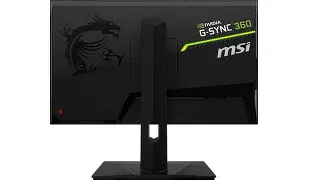
Real-world use cases
- Competitive FPS and esports players: The monitor is tailored for players who game at high frame rates and value the smallest advantage in reaction and tracking. Tournament players and avid esports competitors will appreciate the responsiveness and small size that keeps targets physically smaller on-screen, aiding quick flicks.
- Content creators who also game: For streamers who need a reliable, fast panel for gameplay and a second color-accurate display for editing, the Nxg253R works well as the gaming monitor in a dual-monitor setup, but it is not an ideal single-display solution for color-critical editing.
- General multimedia and office work: It handles desktop tasks, video conferencing and streaming video adequately, but buyers who prioritize cinematic movie-watching, immersive color, or wide viewing angles should consider larger, higher-resolution alternatives.
- Console gaming: Consoles rarely output near 360fps at 1080p, so the monitor’s strengths are less impactful for PlayStation and Xbox owners unless they play on platforms that support high frame rates and use compatible HDMI inputs.
Comparison with similar models
To help contextualize the Nxg253R's position in the market, the table below compares core attributes against two well-known 360Hz competitors.
| Feature | Oculux Nxg253R | ASUS ROG Swift (360Hz class) | Alienware 25 (360Hz class) |
|---|---|---|---|
| Screen size | 24.5" | 24.5" | 25" |
| Resolution | 1920×1080 | 1920×1080 | 1920×1080 |
| Panel type | Fast IPS | Nano/Fast IPS | Fast IPS |
| Refresh rate | 360Hz | 360Hz | 360Hz |
| Response time | 1 ms (GtG) | 1 ms (GtG) | 1 ms (GtG) |
| Adaptive sync | G-SYNC Compatible / FreeSync | G-SYNC Ultimate / Adaptive | G-SYNC Compatible |
| Typical brightness | 350–400 cd/m² | 400–450 cd/m² | 350–400 cd/m² |
| Typical price positioning | Mid-to-upper | Premium | Premium |
Pros & Cons
- Pros:
- Outstanding motion clarity: 360Hz + 1 ms response produces extremely smooth motion for competitive titles.
- Compact competitive size: 24.5" supports quick target acquisition and is preferred by many pro players.
- Ergonomic stand: Full adjustment helps maintain comfortable posture during extended sessions.
- Practical connectivity: DisplayPort 1.4 and USB hub cover common esports needs.
- Reasonable color accuracy for the category: Good sRGB coverage makes it usable for everyday content.
- Cons:
- Limited usefulness without a high-frame-rate PC: Benefits are minimal if the system cannot sustain high fps.
- Not ideal for color-critical work: Wider gamut and deeper contrast options exist in other classes.
- Basic HDR implementation: HDR, if included, will not match premium HDR monitors with local dimming arrays.
- Price premium for niche performance: The cost is higher than typical 144Hz panels and may be hard to justify for casual players.
Buying guide: who should consider the Nxg253R?
The decision to buy the Nxg253R comes down to a match between the buyer’s primary use cases, hardware, and budget. Below are factors buyers typically weigh and how the Nxg253R aligns with each.
1. Is speed the priority?
If the primary goal is maximum frame rate and lowest perceptible input lag for competitive shooters, the Nxg253R is a strong contender. The combination of a 360Hz panel and aggressive response-time tuning benefits players in titles where split-second reactions matter.
2. Is the PC capable?
High refresh rates are only useful when the system can deliver matching frames. Buyers should consider whether their GPU and CPU can sustain 200–360 fps in target games. If not, money may be better spent on a more balanced monitor or on upgrading the PC first.
3. Does portability or desk size matter?
At 24.5 inches, the Nxg253R is compact and fits smaller desks or multi-monitor arrays without overwhelming the workspace. Tournament players or LAN attendees who prefer smaller setups will appreciate the size.
4. Is color quality or HDR a priority?
Users who primarily create visual content, edit photos, or watch HDR movies should evaluate monitors with higher resolution, wider gamut (Adobe RGB or DCI-P3), and stronger HDR performance. The Nxg253R trades some of these characteristics for speed.
5. What is the budget and expected lifespan?
360Hz monitors command a premium relative to mainstream displays. Buyers should weigh whether the competitive edge justifies that premium for their play style, and consider warranty and service options as part of total cost of ownership. For those who refresh hardware frequently, the monitor remains a defensible investment; for casual players, less expensive 144–240Hz options deliver more value per dollar.
Shop the latest Electronics picks on Amazon.
Browse Now →Setting expectations: tuning and calibration
Out of the box, many fast gaming monitors emphasize contrast and oversaturated color to look impressive on retailer floors. Buyers who care about accurate color should plan a quick calibration with a colorimeter or use validated presets available in the on-screen display. Gamers can also tune sharpness, black stabilizer and overdrive settings (to balance ghosting versus overshoot) to find the best compromise for their titles.
Value assessment: is it worth the price tag?
Value is subjective and depends on how the monitor will be used. For a competitive gamer with hardware capable of sustaining high fps, the Nxg253R offers tangible benefits that can translate into better performance and comfort. Its ergonomics and practical feature set are also important for long-term daily use.
However, if gaming sessions are casual, or if the user primarily consumes movies, edits high-resolution photos, or uses a console, the price premium for 360Hz would be harder to justify. In such cases, higher-resolution or higher-contrast monitors can provide more perceptible quality improvements.
In short, the Nxg253R is worth the price tag for users who need and will use its core advantage—high refresh rate and low latency. For everyone else, the incremental performance gains are not always worth paying significantly more than a 144Hz or 240Hz alternative.
Practical purchasing checklist
- Confirm the GPU/CPU can frequently reach high frame rates in target games.
- Verify that DisplayPort 1.4 or the specified input supports the desired refresh rate; HDMI may be limited.
- Check warranty length and panel replacement policy for static image retention and dead pixels.
- Plan for calibration if accurate color reproduction is desired; budget for a colorimeter if necessary.
- Test or confirm ergonomic compatibility with the desk and seating arrangement (mounting options, VESA compatibility).
Conclusion
The Oculux Nxg253R is a purpose-built competitive gaming monitor. Its strengths—360Hz refresh rate, fast response time, compact size and ergonomic stand—make it a compelling choice for serious esports players or enthusiasts who pair it with hardware capable of very high frame rates. The trade-offs are familiar: less emphasis on wide color gamut, cinematic HDR, and ultra-high resolution. The monitor represents good value within its niche, but whether it is worth the price depends on how closely the buyer’s needs align with its core capabilities. For players who prize competitive advantage and prioritize speed above all else, the Nxg253R often justifies its cost; for users seeking a more versatile all-in-one display, other options may deliver a more convincing balance of features and price.